Traditional antivirus solutions focus on what is executing (relying on file hashes, signatures, and static heuristics). Advanced threat actors easily bypass these defenses by utilizing Living Off The Land Binaries and Scripts (LOLBAS)—native, signed Microsoft tools like powershell.exe, certutil.exe, or cmd.exe.
Process lineage analysis shifts the paradigm. Instead of asking “Is this binary malicious?”, DFIR analysts ask: “Who is the parent of this binary, and is this relationship logical?”
Legitimate programs follow predictable execution paths. When an adversary establishes a foothold, they inevitably break these logical rules, leaving a glaring behavioral signature.
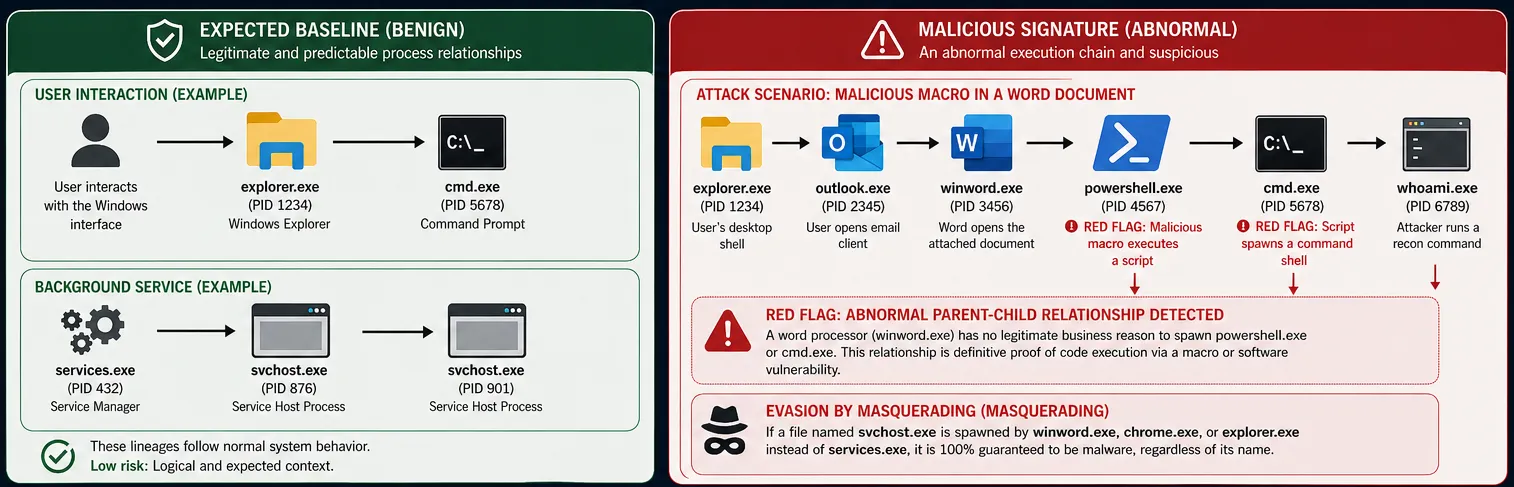
When a standard user interacts with the Windows graphical interface to open the command prompt, the lineage reflects human interaction with the OS shell:
explorer.exe → cmd.exe
Consider a classic initial access vector: A user receives a weaponized Word document via email, opens it, and enables macros. The macro silently downloads and executes a reverse shell.
The resulting process tree exposes the attack instantly as a single, continuous execution chain:
explorer.exe (User's desktop shell)
└── outlook.exe (User opens email client)
└── winword.exe (Word opens the attached document)
└── powershell.exe (🚨 RED FLAG: Malicious macro executes a script)
└── cmd.exe (🚨 RED FLAG: Script spawns a command shell)
└── whoami.exe (Attacker runs a recon command)
The DFIR Analysis:whoami.exe, cmd.exe, powershell.exe, and winword.exe are all 100% legitimate, digitally signed Microsoft binaries. However, a word processor has absolutely no legitimate business reason to spawn PowerShell or a command interpreter. This abnormal parent-child relationship is definitive proof of code execution via a macro or software vulnerability.
Figure 1: Process Lineage (Parent-Child Relationships)
Adversaries frequently rename their malware payloads to blend in with normal system activity (e.g., renaming a backdoor to svchost.exe).
Process lineage analysis defeats this evasion technique instantly. A legitimate svchost.exe is exclusively spawned by services.exe. If an analyst observes an executable named svchost.exe being spawned by winword.exe, chrome.exe, or explorer.exe, it is guaranteed to be malware, regardless of its name.
To reconstruct a process tree historically, organizations require highly granular endpoint telemetry.
Windows Event ID 4688
The native Windows Security log for Process Creation. It contains the New Process ID and the Creator Process ID (the parent). By chaining these PIDs together chronologically, analysts can manually reconstruct the entire execution tree. Note: Command-line auditing must be enabled via GPO for this to be effective.
Sysmon Event ID 1
Sysmon significantly improves upon native logging by introducing the ProcessGuid and ParentProcessGuid. These globally unique identifiers allow for flawless process tree reconstruction across reboots and PID recycling.
Endpoint Detection and Response (EDR)
Modern EDR solutions automatically ingest this telemetry and graphically map the process tree. This visualization is the core component of the EDR Alert Triage Playbook, enabling analysts to understand the entire attack chain in seconds.
Mastering process lineage analysis is what elevates a security professional from relying on static signatures to conducting true behavioral threat hunting. By constantly asking “Who is your parent?”, analysts can uncover the most sophisticated intrusions, rendering traditional evasion techniques obsolete.