Playbook: Lateral Movement – SMB vs. RDP
1. SMB: The “Ninja” (Stealthy and Scriptable)
Section titled “1. SMB: The “Ninja” (Stealthy and Scriptable)”When an attacker leverages SMB for lateral movement, they operate as a script. There is no graphical interaction—only command-line instructions executed rapidly across the infrastructure.
- The Attacker’s Experience: The operator sits behind a terminal (cmd or PowerShell) on a pivot machine. They do not see the victim’s screen.
- The “File Explorer” Myth: Attackers rarely use the Windows GUI Explorer. It leaves too many traces, such as Shellbags. Instead, they utilize native tools like
net useto mount hidden administrative shares (C$,ADMIN$) and transfer payloads programmatically. - Why SMB?
- Visual Stealth: The legitimate user logged into the victim machine sees nothing. No windows open, no mouse cursor movement.
- Scalability: An attacker can deploy a binary to 1,000 endpoints in five minutes using a single script, a feat impossible via RDP.
- Remote Execution: Utilizing PsExec allows the attacker to dump a service and trigger execution instantly.
- Forensic Signature: Look for Event ID 4624 with Logon Type 3 (Network).
2. RDP: The “Tank” (Interactive and Invasive)
Section titled “2. RDP: The “Tank” (Interactive and Invasive)”RDP is used when the adversary requires full control of the victim’s session. They want to “live” in the machine, browse files, and manually execute tools.
- The Attacker’s Experience: A window opens on their screen. They see the victim’s desktop, have full control of the mouse/keyboard, and can interact with any GUI-based application.
- Why RDP?
- Interactivity: Many legacy line-of-business applications or complex hacking tools require a GUI to function.
- Legitimacy: RDP is often permitted for remote administrators, allowing the attacker to hide in plain sight.
- The Forensic Trade-off: RDP is “noisy.” On a standard Windows 10/11 workstation, an incoming RDP session typically disconnects the local user, immediately alerting them to the compromise.
- Forensic Signature: Look for Event ID 4624 with Logon Type 10 (RemoteInteractive).
3. Decision Matrix for Incident Responders
Section titled “3. Decision Matrix for Incident Responders”| Scenario | Attacker Choice | Rationale |
|---|---|---|
| Reconnaissance | SMB | Faster, leaves fewer artifacts in the GUI. |
| Payload Staging | SMB | Highly efficient file copy via ADMIN$. |
| Complex Tooling | RDP | Requires GUI for execution/interaction. |
| Exfiltration | SMB | Silent, background data piping. |
| Ransomware Final Stage | SMB + RDP | RDP to verify/browse, SMB to mass-encrypt the farm. |
4. The Combined Chain (The Frequent Scenario)
Section titled “4. The Combined Chain (The Frequent Scenario)”Threat actors often chain both protocols to ensure success:
- The Probe (SMB): The attacker attempts
net use \\Target\C$. Success proves administrative rights. - The Preparation (SMB): If RDP is disabled, the attacker uses SMB to modify the Registry remotely and enable RDP services.
- The Invasion (RDP): Once prepared, the attacker connects via RDP to “move in,” manually explore files, and execute the final stage of the attack.
5. Threat Hunting Strategy
Section titled “5. Threat Hunting Strategy”// Pivot from a suspicious RDP session back to potential SMB staginglet SuspectTime = datetime(2026-02-12T14:00:00Z);SecurityEvent| where EventID == 4624 and LogonType == 10| where TimeGenerated between (SuspectTime .. (SuspectTime + 1h))| extend AttackerIP = IpAddress| join kind=inner ( SecurityEvent | where EventID == 4624 and LogonType == 3) on IpAddress| project TimeGenerated, Computer, Account, IpAddress, LogonType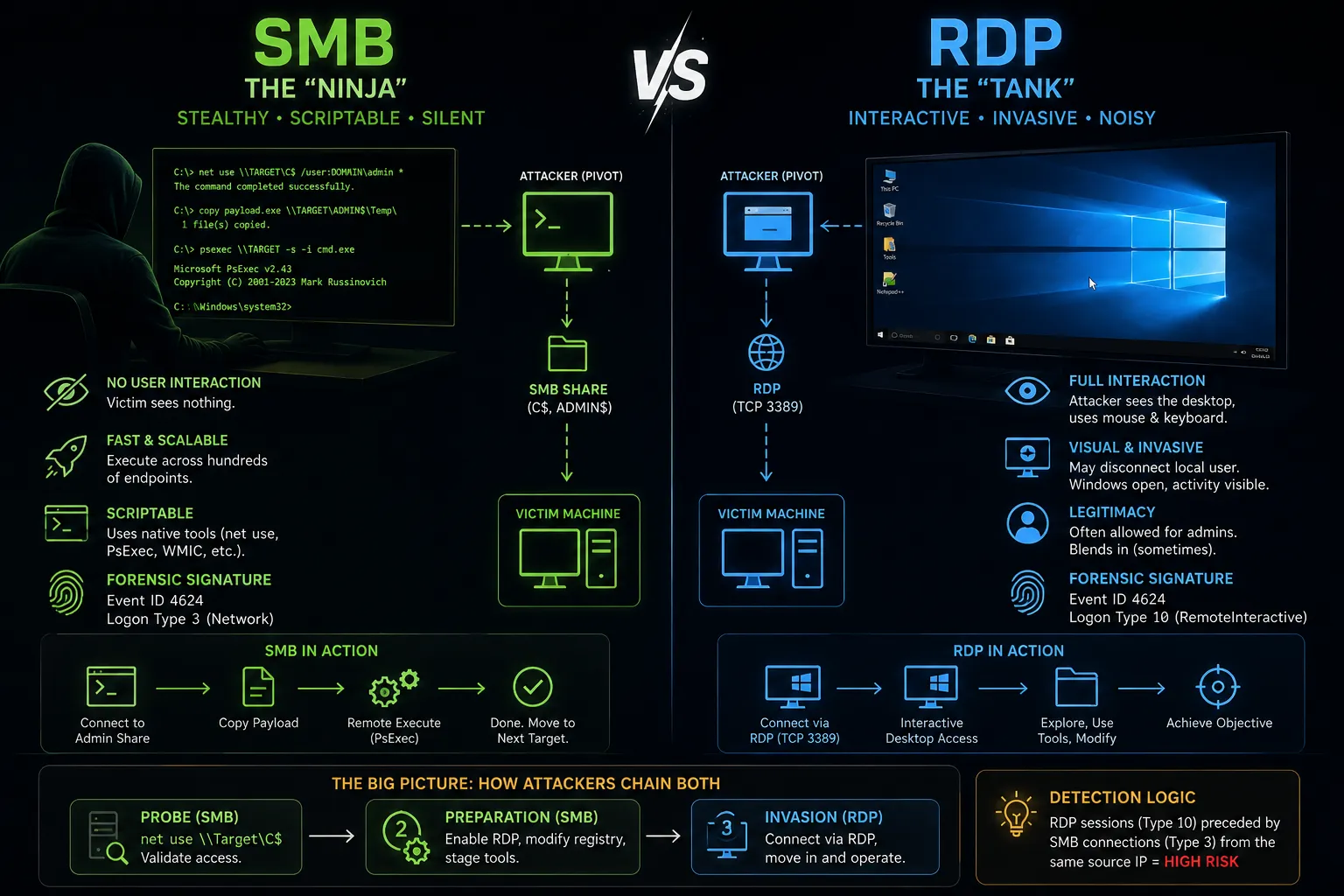
References & Further Reading
Section titled “References & Further Reading”- MITRE ATT&CK: Remote Services: SMB/Windows Admin Shares (T1021.002)
- Related Artifact: Windows Logon Events (4624/4625)
- Related Playbook: PsExec & Lateral Movement